Showing posts with label Unit1TB1. Show all posts

Monday, 8 December 2014

TB1L8 Security & Privacy

BA2 demonstarte how personal information stored on a mobile phone pose a threat to privacy

STARTER:

228


What does this number represent?
What information could somebody extract from a person's mobile phone.....?
TASK:
Complete Protect My Data in O:\ICT\GCSE ICT Year 9 2014\TB1\Lesson 8 Security & Privacy

Think about the ways that a user can protect their own data and how they might do that.

Examples:
  • password protection
  • data encryption
  • keypad locks
  • time-outs.

PLENARY:

GPS?

What is it? What is it used for? Can you think of any Apps that may use this technology?

Post your answers as a comment on THIS post. Remember to select Name/URL as your profile and only include your FIRST name on your post


HWK:

ShowMyHomework.co.uk

Find a media story in which a mobile phone plays a key role. Reflect on what happened and extrapolate lessons learnt.



Thursday, 4 December 2014

TB1L7 Responsible Use

BA2 explain restrictions (legal and other) on mobile phone use and why they are imposed 


ON ENTRY:

Collect your folder, a blue front sheet and a green pen.

You have 12 minutes to attach your sheet to the front of your work and use the green pen to respond to the feedback on your work so far.

Start to complete the checklist on the front for work completed up to this point. You may work in pairs for this section if you are unsure.

STARTER:


Was James breaking the law? Would ‘hands free’ have prevented the accident?

In this case mobile phone usage is prohibited by law. Can you think of any situations in which, although mobile phone use is legal, it’s not the ‘done thing’ to use a mobile phone?

TASK:

In pairs, or individually, complete No Phones Allowed found in O:\ICT\GCSE ICT Year 9 2014\TB1

List places/situations where mobile phone use is prohibited, the reason for the ban and possible consequences of non-compliance.

Once complete, work with another pair to compare lists and differentiate between ‘must not’ and ‘should not’ restrictions - make notes on your findings.

Print out a copy for both people if you worked in a pair.


EXT:

Design a digital poster to promote responsible use of mobile phones.


PLENARY:

Discuss examples of what acceptable/unacceptable behaviour on a mobile phone means....

What do they have in common? What is different? Why? What sanctions would they impose?


HWK: Show My Homework - links to BBC Bitesize/SAM Learning - Assessment in 2 weeks time....


Monday, 17 November 2014

TB1L6 Making Connections

BA2 explain methods of transferring data between mobile phones and select appropriate methods of data transfer

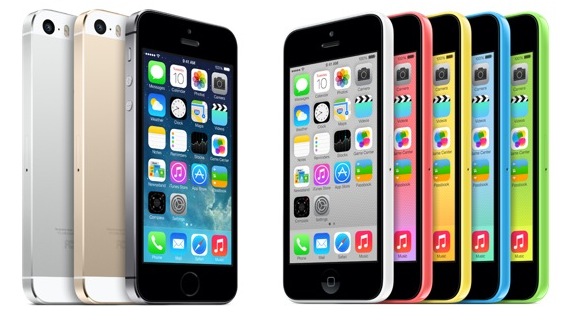
Apple iPhone 5s/c
STARTER:

I have just taken a photo on my phone - how do I transfer my photo to your phones....?

TASK:

Complete the Data Transfer Table in O:\ICT\GCSE ICT Year 9 2014\TB1

This can be completed using your own personal experiences... or experiment using your's and your partners mobile devices.

What is Bluetooth? and what security issues could there be with this form of transfer?

EXT:

Add 'New Technology' Methods to the sheet you have completed - some of the ways listed are older - what are the most current forms of transfer? Explain them!!

HWK:

ShowMyHomework - Bluetooth - What other ways are available when using Bluetooth technology?


Monday, 3 November 2014

TB1L5 Networks and Coverage

BA2 explain in basic terms the principles of cell networks, defining the difference between connection types and check coverage in a particular area


STARTER:

Have you ever wondered how a Mobile Network works? Have a look at the following article and feedback to a friend when you have read it What is GSM?

TASK:

What's all the fuss about?
"some people are concerned that their health and well-being are being put at risk by mobile phone radiation..."
In pairs, investigate what experts say about the possible health risks posed by mobile phone networks/usage.
Class Discussion
Think carefully about where you are geting your information from.. Is it biased? Who might have an interest in keeping this quiet...?

TASK 2:

Research the mobile phone coverage in your own postcode...
  1. Define differences between GPRS, GSM, EDGE and 3G mobile data networks and how they affect what you can effectively do with your mobile phone.
  2. Which parts of the country have access to high speed data networks? Which don’t? Why is this?
  3. Are people in areas with limited/no access disadvantaged? (Exam 6 mark question)
  4. Talk about newer technologies such as HSPA and 4G which greatly improve the speed at which mobile phone networks provide online access.
Create a Presentation (in a form of your choice) detailing your findings of the above.

Save this into your Unit 1 folder as Networks and Coverage


PLENARY:

Is what you have learnt today going to change the way that you use your mobile phone?

HOMEWORK:

Showmyhomework.com - Design a leaflet providing 'how to' advice on safe/responsible disposal of old mobile phones


Monday, 6 October 2014

TB1L4 Phone Usage

BA2 describe and give examples of how mobile phones are used by people in their daily lives by analysing real life data

STARTER:

Collect your homework phone log from the front of the class. IF you have not got yours with you, print an empty copy and complete (best guess) for the last week.

 
You MUST have 7 days worth of data


TASK:

Either use your own design (C+ grade) or use the template provided (D grade, O:\ICT\GCSE ICT Year 9 2014\TB1\Phone Usage Example), to fill in your details for the course of a week.

You should use the overall totals!

Swap details with a minimum of 4 other students, the more you can collect, the better!

TASK 2: Analysis (C+ Grade)
  1. Create a graph to show your usage. Place this into PowerPoint and annotate your findings
    • Why do you have to make 2 graphs?
  2. In the same way, analyse the findings for 1 other student. Annotate as before.
  3. Complete 2 further graphs comparing ALL people in your table. Again, annotate your work.

PLENARY/EXT:

Discuss and predict how an employed adult’s phone usage would vary from your own and produce a chart to highlight the differences.

Were there any surprises? Do you think your phone usage will change as you get older?

BY THE END OF THIS LESSON YOU SHOULD HAVE...
  1. At least 2 graphs displaying your findings
  2. These graphs pasted into PowerPoint and annotated to show your findings
  3. An answer to the extension task, graph and pasted into PowerPoint and annotated
  4. Your completed 'Phone Log' Homework

HWK:

Phone App Table (SMH)


Monday, 29 September 2014

TB1L3 Accessability

BA2 reason what design functions may be needed for individuals with a particular or special need

STARTER:

Open O:\ICT\GCSE ICT Year 9 2014\GCSE in ICT Unit 1 SAM-MS-final.pdf

Have a look at Question 1, do you think you could answer this after only 3 weeks of the course?

This is a sample exam paper for your course!

TASK 1:

In pairs, giving yourselves 30 seconds each, one at a time, explain what circumstances you feel might prevent someone from using an ordinary mobile phone. The second person must not repeat any of the first persons views.

Feedback on your partners view...

TASK 2:

Access the file in: O:\ICT\GCSE ICT Year 9 2014\TB1 called Personal Profiles

As you have before, you are looking to nominate technologies but this time that will suit a given particular or special need.

I am looking for both an ideal world spec and a real world product

You may work as a pair but create your own document

What is meant by the keyword Accessability?

Summarise the phone spec you have chosen and be prepared to feedback to the class.

Save this in your My Documents\ICT GCSE\Unit 1 folder as Personal Profiles

PLENARY:

What can you do to make your phone more accessable?

Thursday, 18 September 2014

TB1L2 Phone Factors

BA2 understand factors that determine which mobile phone best meets an individual’s requirements

STARTER:

What made you pick your mobile phone?
What quantitative factors did you consider?
What qualitative factors influenced your choice?

KEYWORDS:

Factual information is called quantitative data. Information collected about opinions and views is called qualitative data.

TASK 1:

Go to O:\ICT\GCSE ICT Year 9 2014\TB1 and open Users

In pairs, discuss what current available phone suits the need of the customer the best. To keep things fair, only use phones available on www.carphonewarehouse.co.uk

Discuss with another pair about your choices - did you pick the same? If not, why not?

Complete your own document and save this in your My Documents\ICT GCSE\Unit 1 folder as User Requirements

TASK 2:

In small groups, pick 3 phones that might be suitable for this user:

What I need
Now, pick 1 phone from your list that best meets this users preference

What I want
Explain your findings in a Presentation or Leaflet...

Be prepared to feedback your answers using both QUALITATIVE & QUANTITATIVE reasoning

PLENARY:

Open O:\ICT\GCSE ICT Year 10 2013\GCSE in ICT Unit 1 SAM-MS-final.pdf

Have a look at Question 1, do you think you could answer this after only 2 weeks of the course?

This is a sample exam paper for your course!

HOMEWORK:

Showmyhomework.com - Keep a Phone Usage Log....


Thursday, 4 September 2014

TB1L1 Phone Features

BA2 differentiate between mobile phones according to how well suited they are for particular activities

  • Create a folder called ICT GCSE inside your My Documents folder
  • Inside that create another new folder called Unit 1

STARTER:

Do you agree that a Mobile Phone is a 'must have' Digital Device?

TASK 1:

Open up the file Phone Ranking Table from O:\ICT\GCSE ICT Year 9 2014\TB1 and using the Specification sheet provided, explain in each box why you have decided each phone is the best for that particular purpose.

Save this piece of work in: My Documents\ICT GCSE\Unit 1 as Phone Ranking Table

TASK 2:

In software of your choice, research and produce a list of all of the features/functions of a modern day phone. Using the list below, develop a phone for each of the following people. Remember to think about the specifications covered before.
  • Sportsman
  • Fire Brigade
  • Sailor
  • Architect
  • Accountant
  • Football Manager 
Note: You can develop your own phone, it does not have to be an existing product

Appreciate that different phones are available, with different functions and these can be used for different purposes.

EXT 1: Go on to the internet and suggest current models of phones that would be appropriate for the jobs you have listed. include images in your findings.

EXT 2: Pretend it is the year 2000... Provide a selection of 'top of the range' phones (with images) listing functions and features from that era.

Compare them to the iPhone 5s and Galaxy S4......


Save this piece of work in: My Documents\ICT GCSE\Unit 1 as Phone Models


TASKS FOR TODAY:
  • Phone Ranking Table
  • Complete Features for Jobs list
  • Find phones available today that suit those jobs (crush proof, waterproof etc)
  • List the features/best phone around in the Year 2000
  • Complete/Hand in homework


PLENARY/HWK:


ShowMyHomework.com - Phone Features Table

Friday, 28 March 2014

TB1L10 Haves & Have Nots

BA2 explain the causes of unequal access to mobile phone services its impact on lifestyles and life chances

STARTER:

Consider life without a mobile phone. Are individuals who for some reason don’t/can’t use a mobile phone disadvantaged? What do they miss out on? Is this necessarily a bad thing?

TASK: Barriers to Access

In software of your choice (possibly a PowerPoint slide or Publisher (poster)) create a list/MindMap of the causes of unequal access to mobile phone services.

On separate slides, provide examples of each category you have thought of.

You may work in pairs (print 2 copies)

TASK 2: Haves & Have Nots

Consider how not being able to use a mobile phone for whatever reason impacts on an individual’s quality of life and life chances, e.g. their access to goods and services, entertainment, opportunities for interacting, keeping in touch and socialising.

What are their knock-on effects for education and training, health and well-being, employment opportunities?

 In your PowerPoint/Poster, summarise your thoughts then suggest three ways of helping a particular groups of ‘have nots’.

PLENARY:

Next lesson and catch up....

Monday, 24 March 2014

TB1L9 Business Phones

BA2 describe the use of Business Mobile Phones by analysing how their usage impacts on work/life balance
 
 
On Entry - What is meant by Business Phone and Work/Life balance?

STARTER:

Blackberry logo

‘Research indicates that Blackberries significantly improve business effectiveness, responsiveness and customer service.’

Why do you think a Blackberry can make so much difference?

2 minute Pair/Share - Be prepared to feedback on your partners ideas...
  
TASK 1:
 
Using the answers you have just discussed work in groups of 2 or 3 to investigate business phones such as the Blackberry. Consider the following:
  • What features do they have that make them particularly suitable for business use?
  • What can’t they do?
  • How can equipping an employee with a business phone make them more productive?
Be prepared to feedback your answers...


TASK 2:
 
Business phones can make employees more productive but at what cost?

Complete Business Phones Year 9 found in O:\ICT\GCSE ICT Year 9 2013\TB1

Think of possible drawbacks to the organisation of equipping employees with Blackberries.


EXT:

Using your learning from prior lessons, consider how mobile phones could be used to monitor an employee’s activities...

Prior Learning:
Lesson 1 – features of phones
Lesson 4 – an employed adult’s phone usage
Lesson 6 – applications of Bluetooth technology
Lesson 7 – legal and other restrictions on phone usage
Lesson 8 – security risks posed by mobile phones.


Print and Show me + Collection of Homework


PLENARY: Work/Life Balance

What do you think about someone who takes their work mobile phone away with them on holiday?

In pairs, think about what professionals need to do to strike the right balance.

Post your answers as a comment on THIS post. Remember to select Name/URL as your profile and only include your FIRST names only on your post

EXT: Consider other's views and comment on their posts...


Tuesday, 26 November 2013

Year 10 - End of Teaching Block 1

BA2 organise your Teaching Block 1 work and justify the conclusions you have come to

TASKS:
  1. Use the Progress Tracker to identify what work (if any) you are missing and print if necessary - this includes homework
  2. Put this work in order as per the Progress Tracker OR the top sheet of your folder

    SHOW ME!!
  3. Once all the work is tagged together, use the Green Pens to self evaluate your work
    • mini review what you have done
    • complete missing sections
    • correct spelling/grammar/bits that don't make sense
  4. Using your completed project as a guide, write a review of your work
    • highlight what you feel you now know, that you didn't before
    • what advise you would give to particular audiences when thinking about purchasing a phone
    • where your thinking might take you in the future when thinking about mobile technology...
You have 2 hours to complete EVERYTHING!
 
EXT:
 
If you believe you have finished everything, complete an animation (in software of your choice (or online)) summarising what you have learnt in this unit...